API Orchestrator
Complete documentation for the Drupal API management module.
API Orchestrator replaces scattered curl_init() calls across your Drupal codebase with a centralized, managed API integration layer. Define your external services and endpoints as Drupal config entities, then make requests with built-in logging, retries, monitoring, and alerting.
Whether your site makes 10 or 10,000 API calls a day, every request is logged, searchable, and exportable from one dashboard. Config entities deploy via drush cex/cim with {{env:VAR}} token support — same YAML files across dev, test, staging, and production.
Installation
Via Composer (recommended)
composer require drupal/api_orchestrator
drush en api_orchestrator -y
drush cr
Enable sub-modules
Each feature is a separate sub-module. Enable only what you need:
# Analytics dashboard
drush en api_orchestrator_analytics -y

# Real-time monitoring
drush en api_orchestrator_monitoring -y

# Alerts with threshold rules
drush en api_orchestrator_alerts -y

# Multi-channel notifications (Email, Slack, Teams, WhatsApp)
drush en api_orchestrator_notifications -y

# Export to CSV/Excel/PDF/JSON with scheduled reports
drush en api_orchestrator_export -y

# Standalone HTML reports with charts
drush en api_orchestrator_reports -y

# ECA workflow integration
drush en api_orchestrator_eca -y

# Sample integrations
drush en api_orchestrator_integration_samples -y
drush en api_orchestrator_sample_shopify -y
drush en api_orchestrator_sample_jsonplaceholder -y
drush en api_orchestrator_sample_magento -y
Quick Start
The fastest way to see API Orchestrator in action is with the built-in sample integrations.
1. Enable Shopify sample
drush en api_orchestrator_sample_shopify -yThis installs a pre-configured Shopify Storefront service pointing to mock.shop (Shopify's official mock API) with 5 GraphQL endpoints. No API key needed.
2. Make your first request
# List products
drush api-orchestrator:request shopify_product_list \
  --data='{"page_size":"5"}'

# Get product detail
drush api-orchestrator:request shopify_product_detail \
  --data='{"handle":"men-t-shirt"}'

# Search products
drush api-orchestrator:request shopify_search_products \
  --data='{"search_term":"pants"}'
3. View results
Navigate to /admin/config/services/api-orchestrator to see the dashboard with all logged requests, response codes, durations, and full request/response bodies.
api_orchestrator_sample_jsonplaceholder for REST API testing with GET and POST endpoints.
Services
A Service represents an external API provider (e.g., Shopify, Magento, your custom backend). It stores:
| Property | Description |
|---|---|
base_url | The root URL of the API (e.g., https://mock.shop) |
api_key | Authentication token (stored encrypted) |
api_key_header | Header name for the API key (e.g., Authorization) |
additional_headers | Key-value pairs for extra HTTP headers |
timeout | Request timeout in seconds (default: 30) |
max_retries | Number of automatic retries on failure |
retry_interval | Seconds between retries |
log_requests | Enable/disable request logging |
log_curl_commands | Log equivalent cURL commands for debugging |
Create services via the admin UI at /admin/config/services/api-orchestrator/services/add or via config install YAML files.
Endpoints
An Endpoint belongs to a service and defines a specific API operation:
| Property | Description |
|---|---|
service_id | Parent service machine name |
path | URL path appended to service base_url |
method | HTTP method: GET, POST, PUT, PATCH, DELETE |
headers | Endpoint-specific headers (merged with service headers) |
query_parameters | Default query string parameters |
body_template | JSON body template with {{token}} placeholders |
is_graphql | Enable GraphQL mode |
is_direct | Execute immediately (vs. queue) |
encoder_type | json or graphql |
decoder_type | json (extensible via plugins) |
Token Replacement
Tokens allow dynamic values in paths, query parameters, body templates, and GraphQL variables.
Simple tokens
# In path:
/api/products/{{product_id}}

# In body template:
{"title": "{{title}}", "price": {{price}}}
Tokens with defaults
# If page_size is not provided, defaults to 20:
{"first": {{page_size|20}}}

# In query parameters:
?status={{status|published}}&limit={{limit|50}}
Passing data
# Via Drush:
drush api-orchestrator:request my_endpoint \
  --data='{"product_id":"42","page_size":"10"}'

# Via PHP service:
$orchestrator->request('my_endpoint', [
  'product_id' => 42,
  'page_size' => 10,
]);
Environments
Each environment (dev, test, live, etc.) is a config entity that you add one by one from the admin UI at /admin/config/services/api-orchestrator/environment. One environment can be marked as the default.
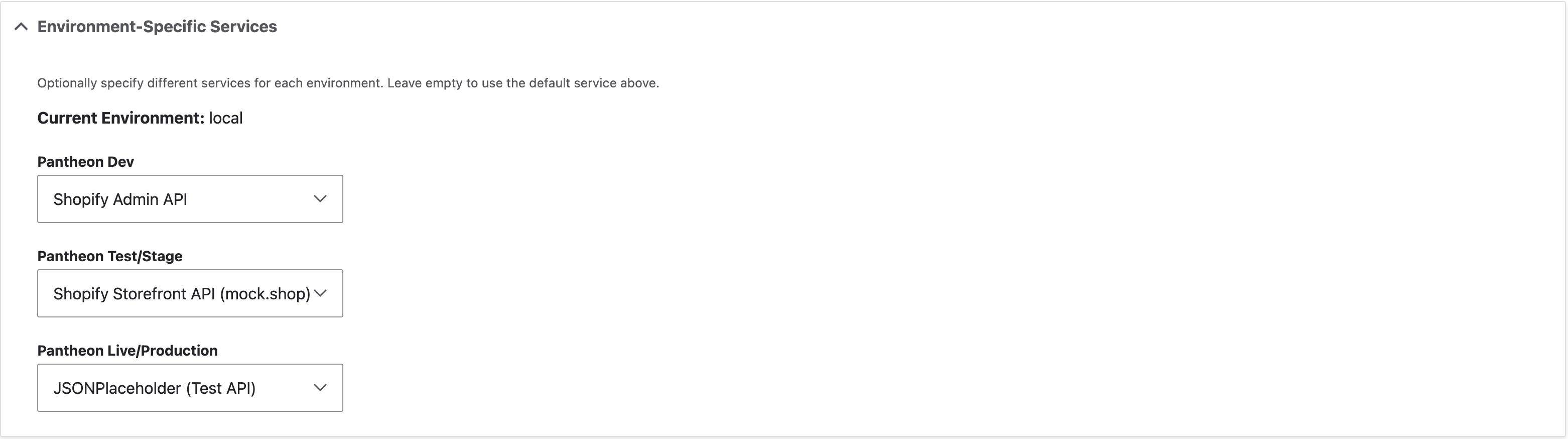
Each endpoint can use a different service per environment. For example, your shopify_product_list endpoint can point to a dev Shopify store in Development, a staging store in Test, and the production store in Live.
URL Pattern Detection
Each environment has a required URL pattern field. The module matches the current request's hostname against these patterns:
| Environment | URL Pattern | Matches |
|---|---|---|
| Development | dev.example.com | https://dev.example.com/* |
| Test/Stage | staging.example.com | https://staging.example.com/* |
| Production (default) | example.com | https://example.com/* |
How service overrides work
- Add environments one by one with a URL pattern and default checkbox
- Create separate services for each environment with different base URLs and API keys
- On the endpoint form, assign each environment its service
- When a request is made, the module detects the current environment and uses the correct service
# Your code never changes between environments:
$result = $orchestrator->request('shopify_product_list', [
  'page_size' => 10,
]);
# On dev  → hits dev.myshopify.com (shopify_dev service)
# On test → hits stage.myshopify.com (shopify_stage service)
# On live → hits prod.myshopify.com (shopify_prod service)
Deployment
# Export config on dev
drush cex -y

# Import on stage/production
drush cim -y
# Same YAML files, environment overrides travel with the config.GraphQL Support
API Orchestrator has first-class GraphQL support. When is_graphql is enabled on an endpoint:
- The
graphql_queryfield stores your GraphQL query/mutation - The
graphql_variablesfield accepts a JSON template with{{token|default}}placeholders - The request body is automatically encoded as
{"query": "...", "variables": {...}}
Example: Shopify product listing
# graphql_query:
query GetProducts($first: Int!, $after: String) {
  products(first: $first, after: $after) {
    edges {
      node { id title handle priceRange { minVariantPrice { amount currencyCode } } }
    }
    pageInfo { hasNextPage endCursor }
  }
}

# graphql_variables:
{"first": {{page_size|20}}}

# graphql_operation_name:
GetProducts
Queue & Direct Mode
Each endpoint can be configured for direct or queue execution:
- Direct mode (
is_direct: true): Executes immediately and returns the response. - Queue mode (
is_direct: false): Adds to Drupal's queue system. Processed on next cron run.
Drush Commands
| Command | Description |
|---|---|
drush api-orchestrator:request <endpoint_id> | Execute an API request |
drush api-orchestrator:request <id> --data='{...}' | Execute with token data (JSON) |
drush api-orchestrator:list-services | List all configured services |
drush api-orchestrator:list-endpoints | List all configured endpoints |
Examples
Sub-Modules Overview
API Orchestrator follows a modular architecture. The core module handles services, endpoints, request execution, and logging. Everything else is a separate sub-module.
| Module | Machine Name | Purpose |
|---|---|---|
| Analytics | api_orchestrator_analytics | Charts, timelines, endpoint performance |
| Monitoring | api_orchestrator_monitoring | Real-time dashboard, heatmap, live feed |
| Alerts | api_orchestrator_alerts | Threshold rules, cooldowns, multi-channel |
| Notifications | api_orchestrator_notifications | Email, Slack, Teams, WhatsApp providers |
| Export | api_orchestrator_export | CSV, XLSX, PDF, JSON + scheduled reports |
| Reports | api_orchestrator_reports | Standalone HTML reports with Chart.js |
| ECA | api_orchestrator_eca | ECA actions, events, conditions |
| Integration Samples | api_orchestrator_integration_samples | Container for sample integrations |
Analytics Module
Provides an interactive dashboard at /admin/config/services/api-orchestrator/analytics with:
- Overview cards: Total requests, success rate, average duration, error count
- Timeline chart: Request volume over time (minute/hour/day/week/month granularity)
- Duration distribution: Response time histogram
- Status code distribution: 2xx, 3xx, 4xx, 5xx breakdown
- Endpoint performance table: Per-endpoint stats with sorting
All data is filterable by date range, service, endpoint, status, HTTP method, response code, and duration range.
Monitoring Module
Real-time monitoring dashboard with:
- Live metrics: Requests in last 5min, 15min, and 1 hour with success/failure counts
- Activity heatmap: GitHub-style heatmap showing request density by day/hour
- Live request feed: Auto-updating feed with pause/resume controls
- Queue status: Current items in queue and processing count
Alerts Module
Define alert rules evaluated on every cron run. Plugin-based channel architecture with built-in Slack and Discord.
| Alert Type | Description |
|---|---|
ERROR_RATE | Percentage of failed requests in time window |
AVG_DURATION | Average response time in milliseconds |
FAILURE_COUNT | Absolute number of failed requests |
NO_REQUESTS | No requests received in time window |
SUCCESS_RATE_DROP | Success rate drops below threshold |
Plugin-based notification channels
Alert channels are Drupal plugins discovered via the #[AlertChannel] PHP attribute:
| Channel | Plugin ID | Description |
|---|---|---|
| Slack | slack | Incoming Webhook with channel override, username, mentions, rich formatting |
| Discord | discord | Webhook with rich embeds, role mentions, severity-based colors |
| Log | — | Always-on Drupal watchdog logging |
Creating a custom alert channel
Notifications Module
Plugin-based notification system with 4 built-in providers:
- Email: Drupal mail system with customizable subject/body
- Slack: Incoming Webhooks with rich message formatting
- Microsoft Teams: Adaptive Cards format
- WhatsApp: Via Twilio API integration
Export Module
Export request data in multiple formats:
- CSV: Always available, no extra dependencies
- Excel (XLSX): Requires
phpoffice/phpspreadsheet - PDF: Requires
dompdf/dompdf - JSON: Raw JSON export
Scheduled Reports
Create scheduled reports that run automatically via cron. Configure name, format, schedule (daily/weekly/monthly), and email recipients.
Reports Module
Generates standalone HTML documents with embedded Chart.js charts. Reports include executive summary, request volume trends, per-endpoint performance, and SLA compliance metrics.
ECA Integration
Integrates with the ECA module (Events, Conditions, Actions).
- Actions: Send API Request, Send Direct API Request
- Events: API Request Completed, API Request Failed
- Conditions: Response Status Code, Response Contains, Service Exists
Example: "When user logs in, sync profile to CRM"
Event:   User Login
Action:  Send API Request
         Endpoint: crm_sync_user
         Data: {"user_id": "[user:uid]", "email": "[user:mail]"}
         Mode: Queue (non-blocking)
Sample Integrations
Shopify Storefront (mock.shop)
Uses Shopify's official mock API. Works immediately with no API key. 5 GraphQL endpoints.
JSONPlaceholder (REST)
Uses https://jsonplaceholder.typicode.com. Zero configuration needed. 5 REST endpoints.
Magento 2 (GraphQL)
10 pre-configured GraphQL endpoints. Requires a real Magento instance.
Custom Encoders & Decoders
The core module ships with json and graphql encoders, and a json decoder. Add custom ones by implementing EncoderInterface or DecoderInterface and registering as a tagged service.
# my_module.services.yml
services:
  my_module.xml_encoder:
    class: Drupal\my_module\Encoder\XmlEncoder
    tags:
      - { name: api_orchestrator.encoder, id: xml }
Events & Hooks
Symfony Events
| Event | When |
|---|---|
api_orchestrator.request.completed | After a successful request |
api_orchestrator.request.failed | After a failed request (all retries exhausted) |
Drupal Hooks
function mymodule_api_orchestrator_request_failed(ApiRequest $request): void {
  // React to failed API requests.
}
API Reference
Making requests in PHP
$orchestrator = \Drupal::service('api_orchestrator.service');

$result = $orchestrator->request('shopify_product_list', [
  'page_size' => 10,
]);

$statusCode = $result->getResponseCode();
$body = $result->getDecodedResponse();
$duration = $result->getDurationMs();
Health Check API
# Public endpoint (no auth required):
GET /api/orchestrator/health

# Response:
{
  "status": "healthy",
  "module": "api_orchestrator",
  "version": "1.0.0",
  "timestamp": "2026-03-08T12:00:00+00:00"
}